How to Install Drama Player on Fire TV, Android TV (2026)

How to install Drama Player on Fire TV, Android TV, and PC. Required video player for HDO Box to ensure smooth HD playback and subtitles.

Drama Player is an essential external video player used together with HDO Box on large-screen platforms such as Fire TV, Android TV, and PC. It is designed to handle HD streaming links, improve playback stability, and ensure smooth subtitle support on TVs and desktops.

If you are using HDO Box on Fire TV, Android TV, or a PC emulator, installing Drama Player is required for videos to play correctly.

What Is Drama Player?

Drama Player is a lightweight media player built specifically for Fire TV, Android TV-based and desktop APK emulator environments. Unlike mobile players, it is optimized for:

  • Remote control navigation
  • Large screens and TV resolution
  • High-bitrate HD and 4K streaming links
  • External subtitle rendering

Drama Player does not provide or host content. It works purely as a playback engine when HDO Box streams a movie or TV show.

System Requirements

Before installing Drama Player, make sure your device meets these requirements:

  • Android TV or Fire OS device, or PC with emulator
  • Stable internet connection
  • Enough free storage (Drama Player is lightweight)
  • Permission to install apps from unknown sources

How to Install Drama Player on Android TV, Fire TV.

Follow these steps on Android TV, Fire TV or Google TV devices.

Step 1: Enable Unknown App Installation.

  • Open “Settings” on your Android TV, Fire TV.
  • Go to “Security & Restrictions“.
  • Enable” Install unknown apps for Downloader or your File manager.

Step 2: Download Drama Player APK.

  • Open the Downloader app on your Android TV, Fire TV.
  • Enter the Drama Player download address or code.
    • Download address: www.hdoboxse.com/drama-player
    • Downloader code: 1487095
  • Start the download and wait for it to complete.
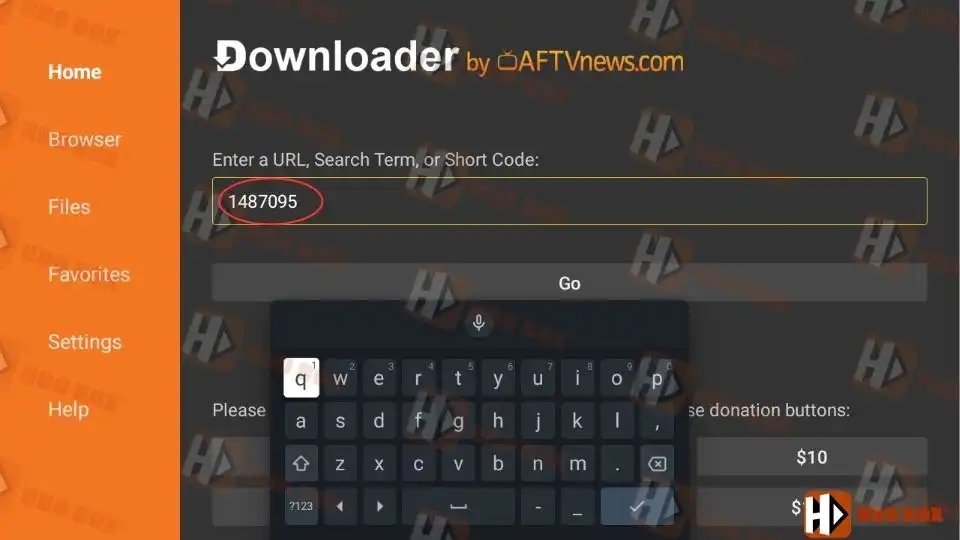
Download Drama Player APK.

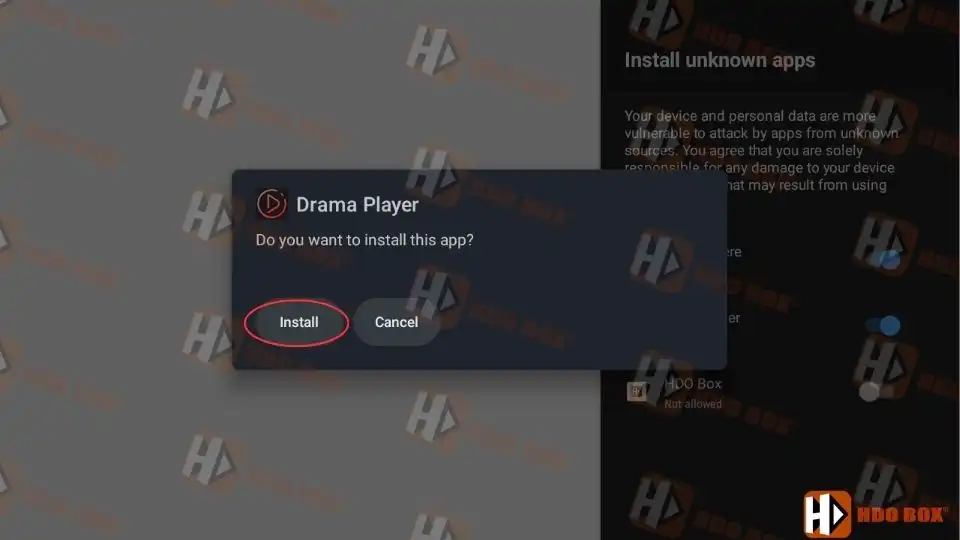
Step 3: Install Drama Player.

  • When prompted, select Install.
  • Wait until installation finishes.
Install Drama Player.

Drama Player will now be available in the background for HDO Box playback.

Why HDO Box Requires Drama Player.

HDO Box uses different playback engines depending on the device:

  • Android phones and tablets use MediaOn Player
  • Android TV and Google TV require Drama Player
  • Amazon Fire TV and Firestick require Drama Player
  • PC and laptop (via emulator) require Drama Player

On Fire TV, Android TV, and PC, the default system players are not fully compatible with HDO Box streaming links. Drama Player ensures:

  • Faster video loading
  • Fewer playback errors
  • Better subtitle sync
  • Stable long-duration playback

How Drama Player Works with HDO Box.

After installing Drama Player:

  • Open HDO Box.
  • Select any movie or TV show.
  • When prompted to choose a player, select Drama Player.
  • Choose Always to set it as default.

From this point on, HDO Box will automatically use Drama Player.

Final Notes.

Drama Player is required for HDO Box on Fire TV, Android TV, and PC.
It ensures smooth playback, better subtitle support, and stable performance on large screens.

If videos do not play correctly on these platforms, installing or updating Drama Player is often the fastest solution.

Why does HDO Box require Drama Player?

HDO Box uses Drama Player on TV and PC platforms because built-in system players are not fully compatible with its streaming formats. Drama Player ensures smoother playback and fewer errors.

Yes, Drama Player is completely free. It does not require subscriptions, registration, or payments.

Buffering is usually caused by slow internet speed or overloaded streaming sources. Try switching sources, lowering video quality, or restarting your device.

No. Drama Player runs in the background and only launches automatically when HDO Box starts video playback.

Drama Player is safe when downloaded from a trusted source HDOBoxSE. It does not collect personal data and works only as a media playback tool.

Picture of RsoGrade
RsoGrade

I’m RsoGrade, the creator of HDO Box. I started this project with one simple goal: to build a streaming app that I would actually love to use myself—something fast, beautiful, and easy for everyone.

Leave a Reply

Your email address will not be published. Required fields are marked *

Newly Updated Article

Recommended Articles