Does HDO Box Support Arabic Subtitles
Yes, HDO Box supports Arabic subtitles, but availability depends on the streaming source. Some movies and TV shows include Arabic subtitle files, while others may only offer English or a limited set of languages.
Arabic subtitles must be:
- Enabled manually in the player
- Available from the selected video source

How to Enable Arabic Subtitles on HDO Box
Follow these steps while playing a video in HDO Box:
Step 1: Open HDO Box
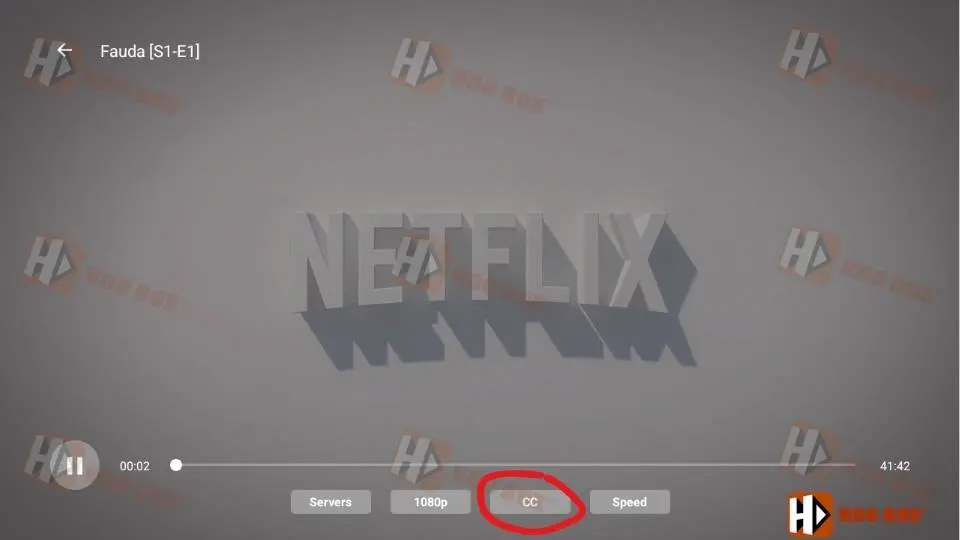
- Open HDO Box > Start playing a movie or TV show (e.g., Fauda).

Step 2: Select the Subtitles
- Wait for the “player” to load the movie successfully.
- Tap the screen to display the player controls.
- Select the Subtitles/Captions icon (CC icon).
- Make sure subtitles are set to ON, not Off.
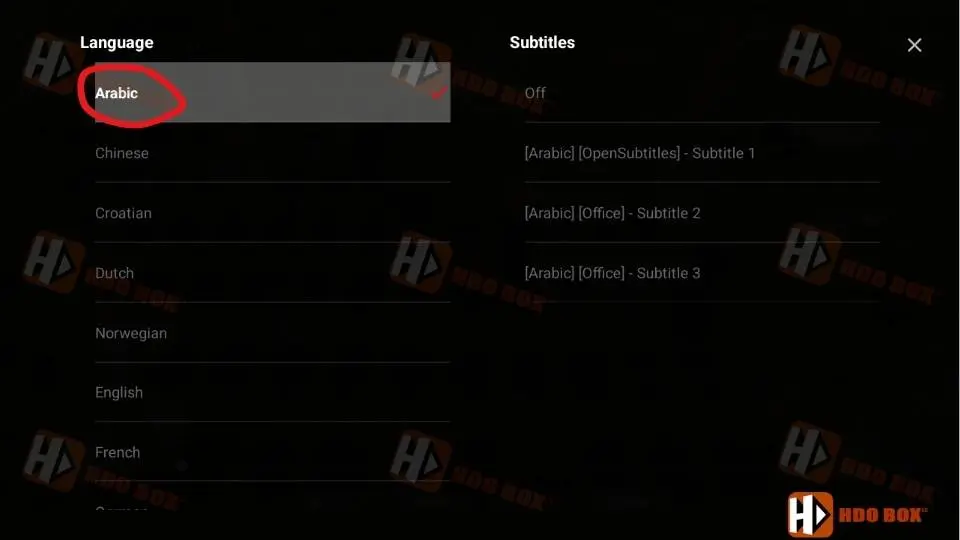
Step 3: Choose Arabic subtitle
- Choose Arabic from the subtitle language list
Step 4: Subtitle download process is complete
- Wait until the subtitle download process is complete and you receive a success notification.

Step 5: Wait for Arabic subtitles to appear
- If the video has Arabic subtitles, they will appear immediately.

What to Do If Arabic Subtitles Are Not Showing
If you don’t see Arabic subtitles in your HDO Box (Subtitles not working), try the following solutions:
- Try a Different Movie or Episode
- Restart or Reinstall HDO Box
- Clear Cache on Android Devices
- Check Android System Caption Settings
Tips for Better Arabic Subtitle Support
- Always update HDO Box to the latest version
- Try multiple sources if available
- Avoid mixing Android captions with in-app subtitles
- Use stable internet to prevent subtitle loading errors
Why Arabic Subtitles May Be Missing
Common reasons include:
- The streaming source does not provide Arabic subtitles
- Subtitle files are missing or broken
- App cache or data issues
- Player language not selected
Unfortunately, subtitles cannot be forced if the source does not include them.
Final Thoughts
HDO Box Arabic subtitles work well when the streaming source provides Arabic caption files and subtitles are enabled correctly in the player. In most cases, simply turning subtitles ON and selecting Arabic solves the issue.
If Arabic subtitles are missing, switching content or sources is often the fastest solution.