
Netfly APK – How to Install on Firestick and Android TV (2026)

Learn how to install Netfly APK on Firestick and Android TV in February 2026. Step-by-step guide, app features, safety notes, and streaming tips.

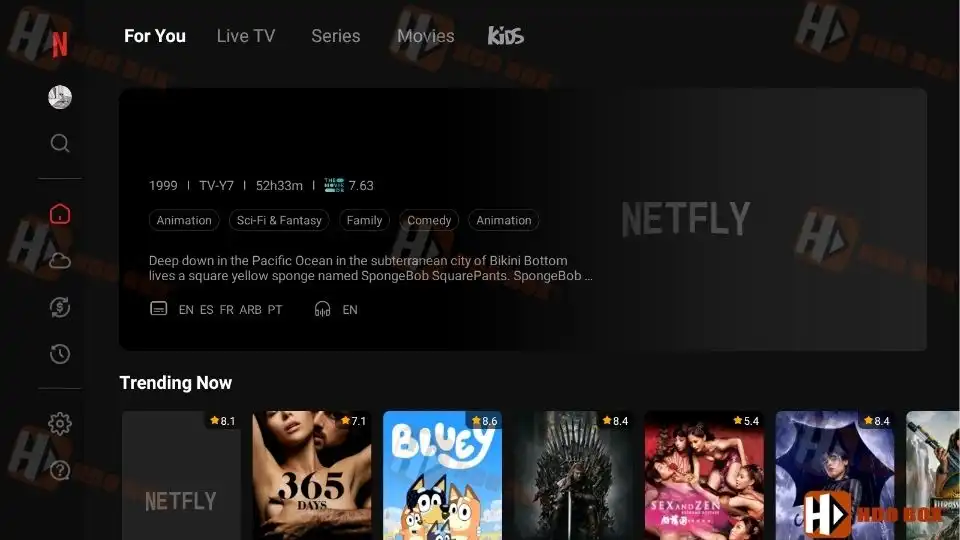
Netfly APK is a third-party streaming application that offers free access to movies, TV series, and live TV channels on Android-based devices. In 2026, Netfly continues to gain attention thanks to its smooth playback, fast loading speeds, and a familiar interface inspired by popular subscription platforms.

This guide explains how to install Netfly APK on Firestick and Android TV, along with important notes about safety, legality, and usage.

What Is Netfly APK?

Netfly is an unofficial streaming app that aggregates content from multiple external sources. It allows users to watch:

  • Movies on demand
  • TV series across different genres
  • Live TV channels, including sports and international streams

The interface is designed to feel familiar and easy to navigate, especially for users who are already comfortable with modern streaming layouts.

Because Netfly is not available on the Amazon Appstore or Google Play Store, it must be installed manually using a sideloading method.


We do not own the “Netfly APK” download link and we cannot guarantee the security of this link. By clicking on the link, you will leave our website and continue at your own risk. We are not responsible for any damages arising from accessing the link.

Devices Supported by Netfly

Netfly APK works on most Android-based platforms, including:

  • Amazon Firestick and Fire TV
  • Android TV and Google TV devices
  • Android TV boxes
  • Android phones and tablets
Devices Supported by Netfly

This guide focuses on Firestick and Android TV, as these are the most common devices used with Netfly.

How to Install Netfly APK on Firestick and Android TV

The installation process is the same for Firestick, Fire TV, Android TV, and Google TV devices. Before starting, make sure the Downloader app is installed and allowed to install unknown apps.

Step 1: Open the Downloader App

  • Launch the Downloader app from your Apps section.
  • Make sure “Install unknown apps” is enabled for Downloader in your device settings.
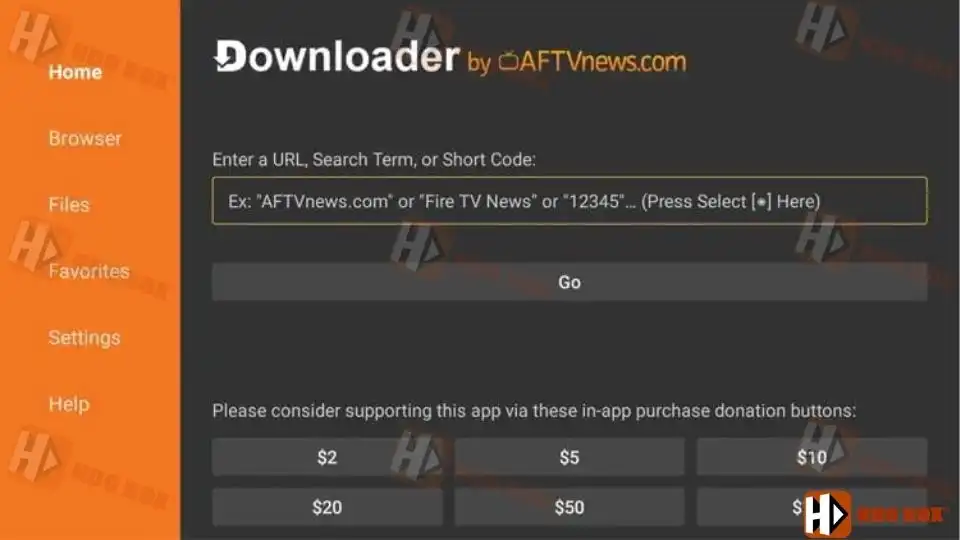
    Open the Downloader App.
    Open the Downloader App.

Step 2: Enter the Downloader Code

  • Click the URL input box in Downloader.
  • Enter the Netfly APK downloader code: 3287827
  • Select Go to begin downloading the file.
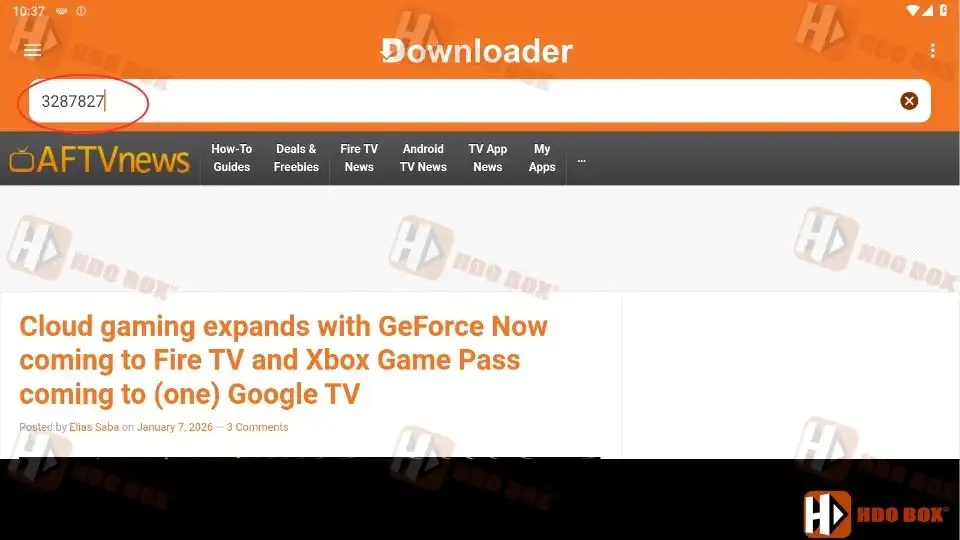
Enter the Downloader Code

Step 3: Wait for the Download to Finish

  • The APK file will begin downloading automatically.
  • Wait a few seconds until the download completes.
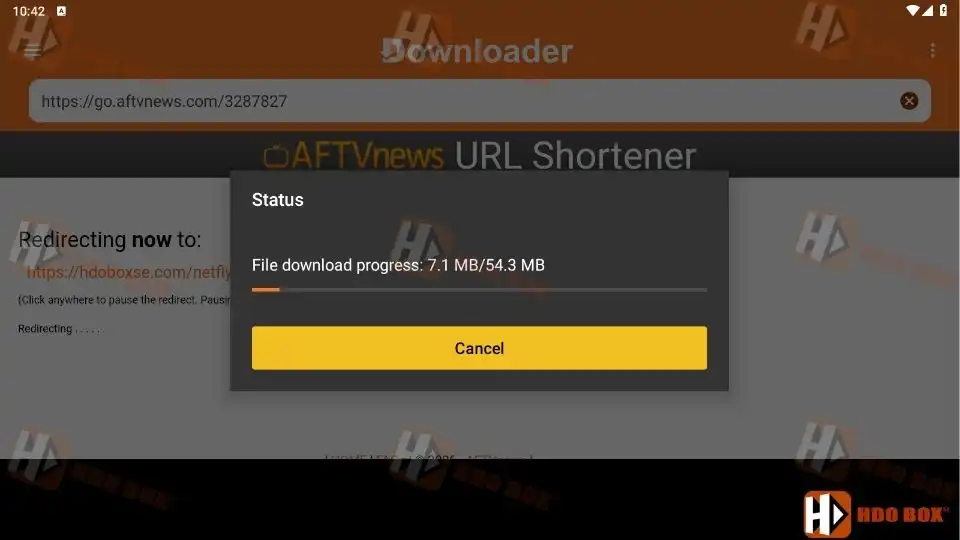
Wait for the Download to Finish

Step 4: Install Netfly APK

  • Once the download finishes, select Install.
  • Wait for the installation process to complete.

Install Netfly APK
Install Netfly APK

Step 5: Open the App

  • After installation, select Open.
  • Netfly will launch and load its interface.

Open the App
Open the App

At this point, Netfly APK is successfully installed on your Firestick or Android TV device.

Is Netfly APK Legal

It is not possible to verify whether Netfly holds proper licensing for the content it provides. Like many unverified streaming apps, it may distribute copyrighted material without authorization.

Users are responsible for ensuring they comply with local copyright laws. Legal streaming services are always the safest option.

Final Thoughts

Netfly APK has become popular in 2026 because it is free, easy to install, and delivers a smooth streaming experience on Firestick and Android TV. It offers a large mix of live TV, movies, and TV series without requiring subscriptions or additional services.


Is Netfly APK free to use

Yes, Netfly APK is free. No subscription, account registration, or debrid service is required to access content.

Yes, Netfly APK includes a live TV section with a large number of channels, many of which focus on sports and international content.

The licensing status of Netfly APK content cannot be verified. Users are responsible for complying with local copyright laws when using unverified streaming apps.

Netfly APK is generally safe when downloaded from a trusted source. However, because it is an unverified app, users should take precautions such as using a VPN and avoiding unnecessary permissions.

To update Netfly APK, download the latest version using the same installation method and install it over the existing app.

Picture of RsoGrade
RsoGrade

I’m RsoGrade, the creator of HDO Box. I started this project with one simple goal: to build a streaming app that I would actually love to use myself—something fast, beautiful, and easy for everyone.

Leave a Reply

Your email address will not be published. Required fields are marked *

Newly Updated Article

Recommended Articles